The Best Tools for Freelancers in 2026 (What You Actually Need vs. What You Don't)
Every tool list online tries to sell you 20 apps. Here's the honest version: the five categories of tools a freelancer actually needs in 2026 — and the one platform replacing most of them.

Contents
One flat fee for the whole team
Tasks, timers, CRM and invoices in one workspace. From $29 a month, no seat tax.
Start free demo14 days · no credit card
01. The Real Cost of a Freelancer's Tool Stack
Before recommending anything, let's look at what the average freelancer is actually spending on tools. A typical 'professional' freelance stack in 2026 looks something like this:
- Project management: $10-15/month (ClickUp, Asana, Monday.com)
- Time tracking: $9-12/month (Toggl, Harvest, Clockify paid)
- Client communication portal: $10-20/month
- Invoicing: $10-15/month (FreshBooks, QuickBooks)
- Cloud storage: $5-10/month
"I added up my SaaS subscriptions one afternoon and nearly fell off my chair. I was paying $780 a year to manage my freelance business. That's almost a week of billable hours."
— Freelance copywriter, 4 years in business
02. Category 1: Task & Project Management (Non-Negotiable)
This is the one category where cutting corners costs you more than the subscription you're trying to avoid. Without a proper task system, you lose billable hours, miss deadlines, and undercharge for scope changes. What to look for: Kanban boards that work fast, deadline visibility across multiple projects, and client management without per-seat fees. What to avoid: tools with so many features that setup and maintenance become their own jobs.
Melororium
Try it in Melororium
Melororium — native Kanban, task ownership, deadline tracking, and project dashboards. Flat monthly fee.
03. Category 2: Time Tracking (Often Skipped, Always Regretted)
Most freelancers skip time tracking until they realize they've been consistently undercharging. Untracked time doesn't just mean lost revenue — it means inaccurate future quotes, because you're estimating without data. The practical rule: track time at the task level, not the project level. 'I worked 3 hours on Client A today' is useful. 'I spent 1.5 hours on the homepage copy draft and 1.5 hours on revision emails' is data you can actually use to price future work accurately.
Melororium
Try it in Melororium
Melororium Timers — live time tracking built into tasks. No separate app, no manual logging — flat-fee from $29/mo, no seat tax.
04. Category 3: Client Communication
You don't need a dedicated client portal app. You need a communication protocol — a consistent way of updating clients that doesn't require them to learn a new tool. What works: a shared project view with controlled permissions (client sees status and deliverables, not your internal tasks), plus a weekly summary email. That's it. Most client portal products charge $10-20/month for functionality you can replicate with good habits and the right permissions in your task tool.
05. Category 4: Invoicing
For most freelancers starting out or working at moderate volume, free invoicing tools cover 90% of needs. Wave is free and handles professional invoices, basic accounting, and payment processing. Most paid invoicing tools are overkill until you're invoicing 10+ clients per month with complex tax situations. The expensive mistake: subscribing to FreshBooks or QuickBooks in year one because it 'feels more professional.' Use free tools until you genuinely need paid features.
Flat fee · no seat tax
Stop renting your team operations.
Melororium replaces your task manager and time tracker in one workspace — flat-fee subscription, no seat tax. Teams save $200-400/year vs ClickUp per-seat pricing.
Starter: $29/mo (4 users)
Agency: $59/mo (15 users)
Studio: $119/mo (Unlimited users)
06. Category 5: File Storage
Google Drive's free tier (15GB) handles most freelancers' file storage needs. Dropbox and Notion's storage features are worth paying for only when you're consistently hitting limits or sharing large files with clients who specifically request those platforms. Default to free. Upgrade when you hit a real constraint — not because the paid plan has a feature you might use someday.
07. The Stack That Makes Sense in 2026
Here's the honest minimum viable freelance stack:
- Task management + time tracking: one unified tool (vs two separate subscriptions)
- Client communication: email + shared project view with permissions (vs dedicated portal app)
- Invoicing: Wave or similar free tool (until volume demands paid features)
- File storage: Google Drive free tier (until you genuinely exceed 15GB)
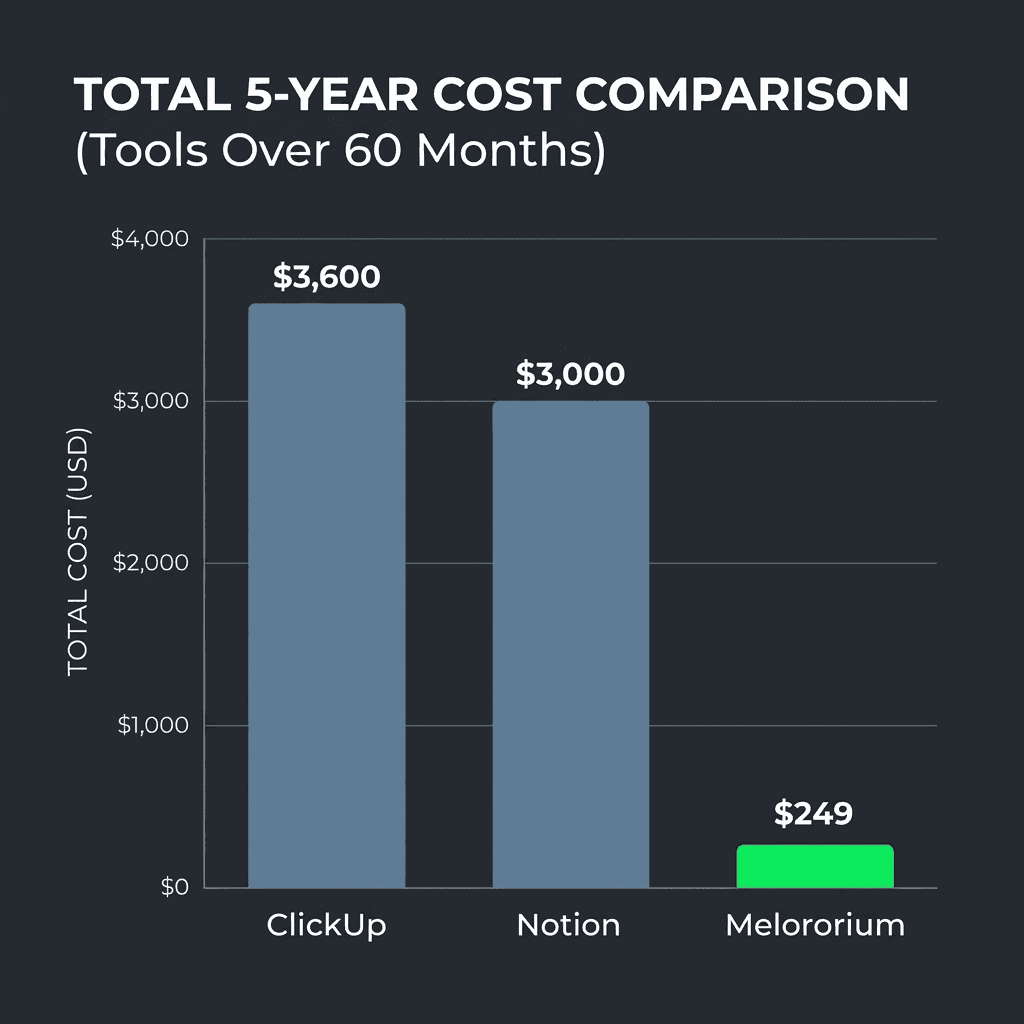
08. What You Can Drop Right Now
Here are the tools most freelancers are paying for that they can cut today:
- Standalone time tracker if your task tool has native timers
- Project management subscription if you can replace it with a flat-fee tool that covers more functions at the same or lower price
- Client portal app if your task tool has permission-controlled sharing
- Premium Notion plan if you're using it for task management rather than documentation
09. New Challengers in 2026 — Still Charging Monthly
In 2026 a new wave of all-in-one freelance tools launched. The promise is the same: one workspace instead of five apps. The price model is not. WorkspaceOne (187 upvotes on Product Hunt, June 2026) markets itself as 'all-in-one for freelancers.' Monthly subscription. TaskFlow AI (342 PH votes) leads with AI-powered task management — also monthly. Relysta launched on Hacker News with 'I built my own solution to manage clients because it got too messy.' Still subscription-based. Let's do the math honestly. A $15/month all-in-one tool costs $180/year. Over three years: $540. A flat-fee tool at $59/mo covers 15 users — $708/year vs $1,800 for the same 10 users on a per-seat plan. The newer something is, the more likely it will raise prices in year two — these tools haven't even hit their first renewal cycle yet. The structural reason every new entrant defaults to subscriptions: recurring revenue is the easiest pitch for investors and the easiest path to predictable MRR for bootstrappers. It's not a criticism of the products — it's a business model choice that puts your monthly budget on the table. The difference with one-time pricing: the vendor's only growth lever is word of mouth. The product has to be good enough that people recommend it. That aligns incentives with your success rather than your retention.
Boards that run themselves
Kanban with subtasks, priorities and a timer on every card
Demo request from Bloom Cosmetics
Website redesign · due Oct 14