MELORORIUM FOR VIDEO PRODUCTION
Your production company stack costs $4,600 / year. Flat fee instead.
Monday.com, FreshBooks, Harvest, Notion, Teamwork — every crew member and producer is a monthly charge. Melororium replaces all five for $59/mo flat. Track shoot days and editing hours inside task cards, manage client briefs in a unified CRM, and generate invoices from time logs. No seat tax,
10 users included. Production management, time tracking, invoicing. No seat tax.

THE PRODUCTION SEAT TAX
Every new crew member you hire makes your software bill worse.
Video production companies run on projects and billable time — but the tools managing those projects charge you monthly per seat. Add a director of photography, add a motion designer, add a post-production coordinator — and every SaaS tool bills you more. Melororium covers your entire production workflow for $59/mo flat: pre-production planning, shoot day task tracking, post-production Kanban, time log aggregation, and client invoice generation. No per-seat billing.
The SaaS Tax
Here is what you are paying every year to run a fragmented workflow:
Cumulative SaaS Tax vs. Flat-Fee Subscription
That's $23,000 saved over 5 years — enough to invest in a new camera kit or a full year of post-production software.
PRODUCTION WORKFLOW
From client brief to delivery invoice, in one workspace.
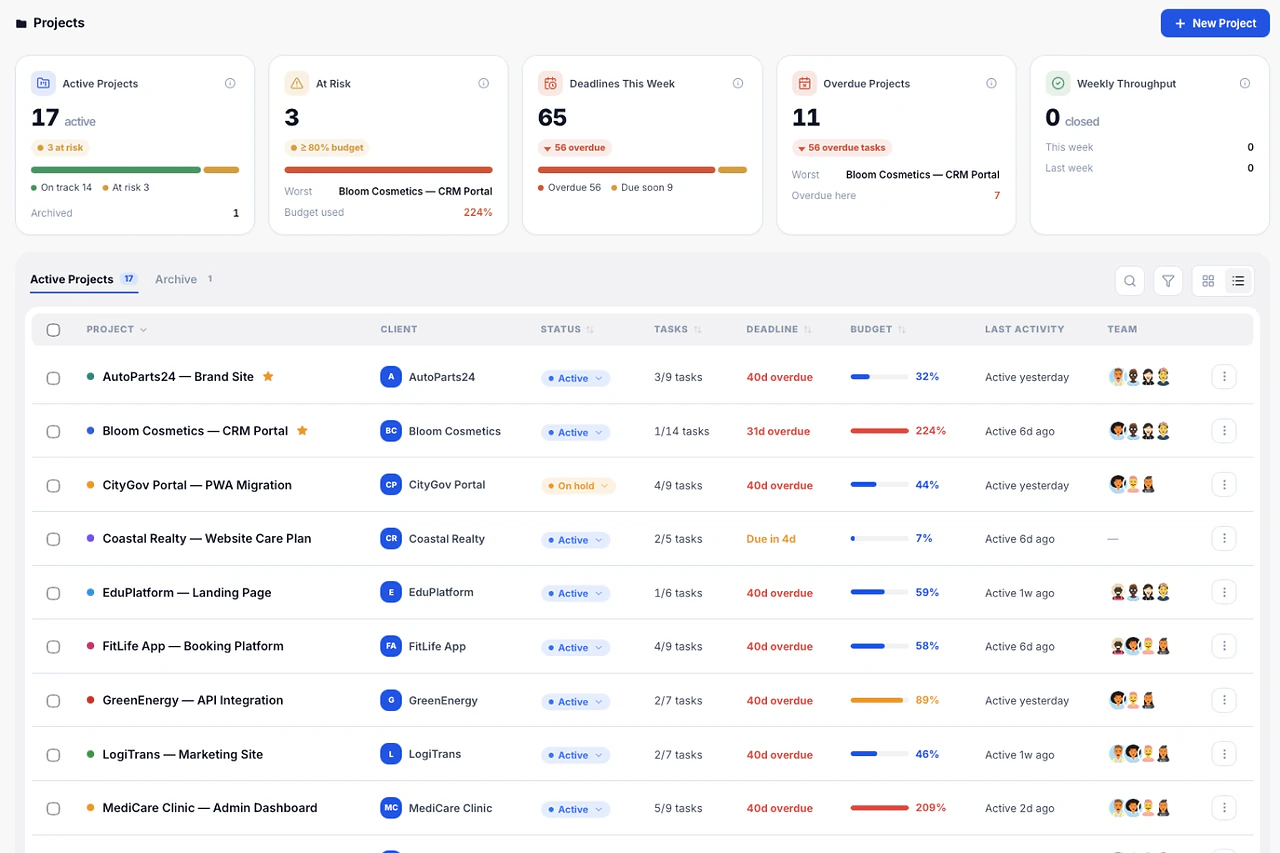
Stop managing pre-production in Monday, tracking shoot days in a spreadsheet, and billing in FreshBooks. Melororium keeps your production Kanban, crew timers, client CRM, and invoice PDF on one screen. Your producers spend less time on admin and more time on what ships.
Client Project Setup
Create a client card in the CRM ledger with project scope, shooting schedule, deliverable specs, and budget parameters. Link directly to the production Kanban for this client. All project data — brief, timeline, financials — lives in one queryable record.
Production Stage Tracking
Build a Kanban board matching your production pipeline: Pre-Production, Shoot, Offline Edit, Online Finish, Client Review, Delivery. Assign tasks to crew members, attach shoot dates as deadlines, and move deliverables forward with sub-100ms drag response. No sync lag, no calendar disconnect.
Crew Time and Day Rate Logging
Configure day rates or hourly rates per crew role. Every task has a built-in stopwatch — crew members log shoot time, editing hours, and review sessions directly inside the task card. Hours accumulate against the project and client automatically, ready for invoice generation without any manual timesheet export.
Project Invoice Generation
When a project milestone or delivery is complete, open Work Reports and select the production. Melororium aggregates all logged time against crew rates, calculates the project total, and generates a branded PDF invoice in one click. Track payment status on the calendar alongside your upcoming shoot schedule.
VALUE COMPARISON
Why pay per seat when you can go flat-fee?
Compare face-to-face. Other SaaS platforms lock your workflows and data behind endless per-seat fees. We believe professional software should be a flat fee for your whole team.
The old way
Paying monthly subscription taxes for every minor tool you use.
Scattered operational records causing workflow gaps and missed hours.
Heavy, sluggish cloud interfaces wasting your daily billable capacity.
Compiling raw timesheets manually to calculate project margins.
The Melororium way
Flat monthly fee for your whole team. Secure, scalable workspace.
Unified time logging and accounting tied directly to active tasks.
Blazing-fast local-first execution with zero interface latency.
Integrated ledger automation generating live performance reports.
ZERO LOADING SPINNERS
Local-first compilation. Zero server delays.
Melororium compiles all database transactions straight inside your client engine before pushing silent sync tasks to the server.
IndexedDB direct write — zero network dependency
React virtual DOM diff — 1 animation frame
Async worker sync — invisible to the user
Server roundtrip + JSON parse + re-hydrate
LIVE TEST
Run a latency benchmark
Simulate a real workspace action and measure local vs remote execution time.
Click run to measure local performance.
EARLY FEEDBACK
See what teams say about Melororium.
Early adopters from agencies and studios share how ditching the subscription stack changed how their teams operate.
Clara Moss
Founder, Mossglow Studio
"I had a successful shop and absolutely no idea if I was actually making money."
Tom Brauer
Founder, Linkframe
"I was paying to make my own life harder."
Marcus Webb
Founder, North Signal Studio
"Every Friday felt like an archaeology dig."
Built for modern digital operations.
Join the early adopters scaling their business layout with Melororium.
PRODUCT FAQ
Frequently
Asked Questions
Have a question that needs a human to answer?
No problem, email us at support@melororium.com
Compare alternatives
Starter ($29/mo) covers up to 4 users — ideal for small teams. Agency ($59/mo, most popular) covers up to 10 users and lets you pick 5 additional modules on top of the 12 core ones. Studio ($119/mo) covers up to 25 users and unlocks all 20+ announced modules. All plans are billed monthly or yearly (save ~30% annually).
Switch plans anytime — your data stays intact and the transition takes seconds. Upgrade is prorated automatically. No lock-in, no penalties for growing your team.
With per-seat tools, every new hire costs more. A 10-person team on ClickUp pays $1,440/yr in seat fees alone. Melororium charges one flat monthly fee for your whole team — add 1 person or 10, the price stays the same. No seat tax that eats into your margins as you grow.
Security is non-negotiable. Melororium operates on end-to-end data encryption (TLS 1.3) with enterprise-grade database separation. Our AI features use strict Bring Your Own Key (BYOK) architecture — your data is never used for model training.
Yes. Melororium supports dedicated Client Portals at no extra cost. Clients can view project timelines and download deliverables. Guest client access does not count against your team seat limit.
Every plan includes: Dashboard, Kanban, Projects, Calendar, Team management, Client CRM, Invoices, Work Reports, Live Timers, Inbox, Time Tracker, and Settings. Agency and Studio plans add extra modules on top of these.
Project Management for Video Production Teams: Managing Pre-Production to Delivery
Video production is one of the most complex project types to manage: it involves multiple phases with different team compositions, significant pre-production planning work, time-sensitive shoot day logistics, and post-production workflows that can stretch over weeks. Most project management tools are built for knowledge work, not for production work — they handle tasks well but do not map naturally to the rhythm of video production. This guide explains how production teams use Melororium to manage complex video projects without the overhead of per-seat SaaS pricing.
The Three-Phase Challenge of Video Production Management
Every video project moves through three fundamentally different operational phases, each with distinct team requirements and management challenges. Pre-production is planning work: scripting, storyboarding, location scouting, crew scheduling, equipment booking. Tasks here are mostly assigned to a small team — director, producer, perhaps a researcher — with tight deadlines and dependencies. A delay in pre-production cascades to shoot day scheduling. Shoot day is coordination work: all hands on deck, strict time-boxing, real-time logistics. Traditional project management boards are not useful during a shoot — the team is on location. But time logging matters more than ever: crew call times, wrap times, meal penalty tracking, and equipment usage all need to be recorded accurately. Post-production is sequential creative work: edit, colour, audio mix, graphics, review, revision, final delivery. Each stage depends on the previous one, and client review rounds can restart the sequence at any step.
The Cost of Managing Video Projects Across Multiple Tools
A video production company managing 10 active projects simultaneously across these three phases needs coordinated visibility that most tools cannot provide. When pre-production is in Asana, shoot logistics are in a spreadsheet, and post-production is in Frame.io or Notion, no one has a complete picture of project status without assembling it manually from four places. Billing is particularly fragmented: crew hours, equipment rentals, post-production hours, and fixed production fees often come from different sources.
How Video Production Teams Structure Melororium
Production companies using Melororium typically create a project for each video production with Kanban columns matching the production phases: Pre-Production, Shoot, Post-Production, Client Review, and Delivered. Within each column, tasks represent specific deliverables and logistics items. Pre-production tasks: script draft, location scout, shot list, crew booking, equipment checklist. Shoot day tasks: morning setup, shoot sessions by scene, equipment wrap, call sheet distribution. Post-production tasks: rough cut, client review round one, colour grade, audio mix, final review, delivery. Time logging happens throughout: pre-production hours for the producer and director, post-production hours for editors and colourists, review time for the project manager. All of this feeds into the work report, which becomes the basis for the final client invoice.
Managing Crew and Contractors Across Productions
Video productions involve large numbers of contractors: camera operators, gaffers, sound recordists, editors, colourists, VFX artists. Each may be engaged for one production or across several. Melororium's workspace allows contractors to be added to specific projects at no extra seat cost (within the plan's user limit). A gaffer added for a shoot week logs their hours inside Melororium, and those hours are automatically attributed to the correct project and client.
Billing Video Productions: Fixed Fee vs. Cost-Plus
Video productions are billed in two primary ways: fixed production fee (a flat price for the deliverable, negotiated in pre-production) and cost-plus (actual production costs plus a production margin). In both cases, accurate cost tracking is essential — for fixed-fee projects, to know your margin; for cost-plus, to build the invoice. Melororium's integrated time tracking and work reports give production companies accurate cost data for both billing models. For fixed-fee projects, compare tracked hours against the estimate to understand margin. For cost-plus, the work report becomes the invoice foundation — crew hours, post-production hours, and expenses all captured in one place.
Client Review Cycles in Post-Production
Client review rounds in post-production are where video projects most often expand beyond scope. A client requests 'just one more revision' — and without clear tracking, those extra rounds become uncompensated work. Melororium's task system handles review rounds as explicitly tracked tasks. Each review request is a new task with a time log. When review rounds exceed what was contracted, the time log provides clear evidence for a scope conversation.
Flat-Fee Pricing for Variable Production Team Sizes
Video production teams fluctuate significantly in size. A narrative film production might bring together 30 people for a shoot week and then contract to a 3-person post-production team for six weeks. Per-seat pricing makes this expensive and administratively painful — seats need to be added and removed constantly. Melororium's flat-fee plans accommodate this variability. The Studio plan at $119/month covers 25 users — enough for most full production crews. During post-production, most of those seats are inactive. The bill remains $119/month throughout. No seat management, no billing adjustments, no surprise charges when the full crew assembles for the next shoot.
Own your production stack. Flat fee.
$59/mo flat for 10 users. Production Kanban, crew time logging, client CRM, invoice generation, and financial reports — all in one workspace. No seat renewals, no seat tax, no add-on fees. Start a 14-day free demo, no card needed.