For social media and marketing teams
Run every client's content calendar from one shared board
Plan posts, track approval rounds, and report results to every client without switching apps or copying data between tools.
14-day free demo. No credit card required.
How social media teams use Melororium
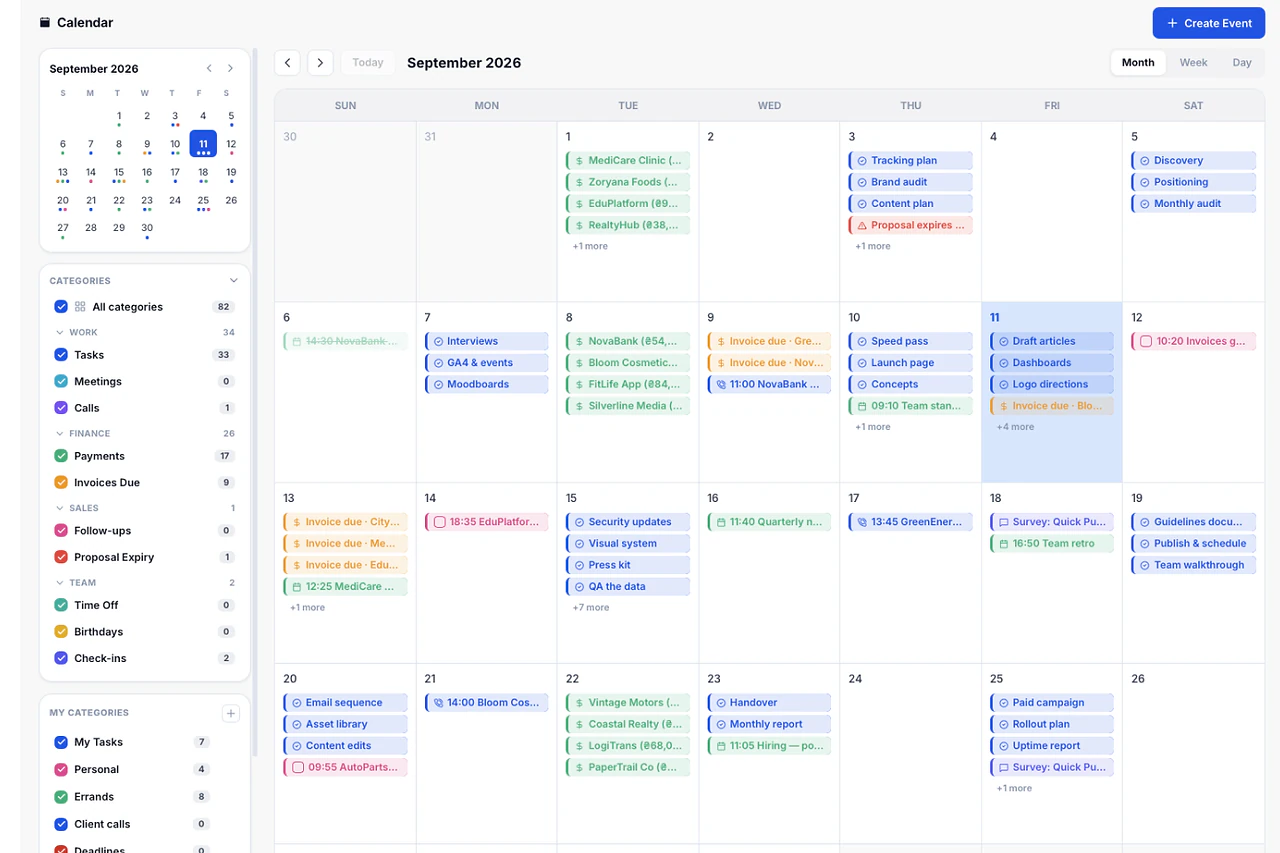
Plan every post across every client on one calendar
Build a posting calendar per client and see every scheduled post, deadline, and approval date without opening a separate spreadsheet.
- Color-coded boards per client or channel
- Deadlines synced with each task's due date
- One view for the whole month across every account
Features
Why social media teams pick Melororium
One calendar for every client
See every scheduled post across every account in a single calendar view, filtered by client or channel when you need it.
Approval reminders that don't get buried in chat
Notifications flag a post waiting on approval so it never sits in a draft column past its deadline.
A status page clients can check without asking you
Give a client a live view of their content status, with no login and no separate email update.
Every caption doc and brand asset in one drive
Store brand guidelines, caption docs, and approved assets by client so nothing lives in a random shared folder.
Proposals that become projects on signature
A signed content proposal turns into an active project automatically, with the first month's tasks ready to assign.
Time logged per client, per platform
Timers track hours against each client and task, so you know what a retainer costs to run.
A budget warning before a retainer runs over
Budget Guardian flags a client account once logged hours cross the budget you set for that retainer.
Pricing
One price for your whole social team
The Agency plan is $59/mo for up to 15 users and 9GB of storage, with Smart Templates, Budget Guardian, Team Sentiment, and Project Alerts AI included.
$59/mo
Agency plan, 15 users
9GB
storage included
14 days
free demo, no card
Templates built for social media teams
More templatesSMM Agency Project Management
Manage 10+ social media clients without losing your mind
SMM Content Calendar
Plan, assign, and track every post across all channels — in one calendar
Social Media Posting Schedule
A weekly and monthly posting schedule across all platforms — always visible
SMM Monthly Report
Send a professional monthly report to every social media client in minutes
Content Production Workflow
From brief to published — every content piece tracked through production
Campaign Planning Template
Plan every campaign from brief to launch — tasks, deadlines, and owners
Content Editorial Calendar
Plan, assign, and publish content across all channels without a separate tool
Retainer Hours Tracking
Track hours used vs. hours sold for every retainer client
More for social media teams
Integrations
Connect your calendar and notification channels so updates reach your team where they already work.
Dashboard
See KPIs, upcoming deadlines, and account health across every client from one dashboard.
Team roles
Set Owner, Admin, and Worker roles so outside contractors only see what they need.
Time off
Track team leave on the same calendar as your content deadlines, so nothing gets scheduled during someone's week off.
Project History
Every task change is logged with a before and after, useful when a client asks what happened to a post.
Recharge
Send automated payment reminders for retainer invoices instead of chasing clients by email.
Team Sentiment
A weekly check-in flags burnout on an account team before it turns into turnover.
Built for teams like yours
Design studios
Track briefs, revisions, and client sign-off for creative work.
Marketing agencies
Plan campaigns, track budgets, and report results across every account.
Web agencies
Run website builds from kickoff to launch, sprint by sprint.
Video production teams
Track shoots, edits, and delivery deadlines project by project.
Further reading

How SMM Agencies Manage Content for 5+ Clients Without Burning Out
Content calendars, approval cycles, revisions, posting, reporting — multiplied by five clients. Here's the operational system that makes it sustainable.
Read article
How to Build a Monthly Social Media Content Plan in 2 Hours
Content planning doesn't need to consume your Sundays. Here's the two-hour system that produces a full month of social media direction — fast enough to actually use.
Read articleMelororium blog
Guides, playbooks and real agency numbers, every week.
Go to the blogFrequently
Asked Questions
Have a question that needs a human to answer?
No problem, email us at support@melororium.com
No. Melororium is a project and client workspace, not a publishing tool. It covers your content calendar, approvals, and client reporting. You still post through each platform's native scheduler.
The Agency plan covers up to 15 team members and unlimited clients in the CRM, at $59/mo.
Yes. Client-specific project boards and the Public Status Page mean each client sees only their own work.
Timers track hours per client and per task, and Budget Guardian, included on Agency, flags a retainer before it runs over.
No. Work Reports turns tracked hours and completed tasks into a report you can export directly.