TIME ARCHITECTURE
Capture every billable minute without micromanagement.
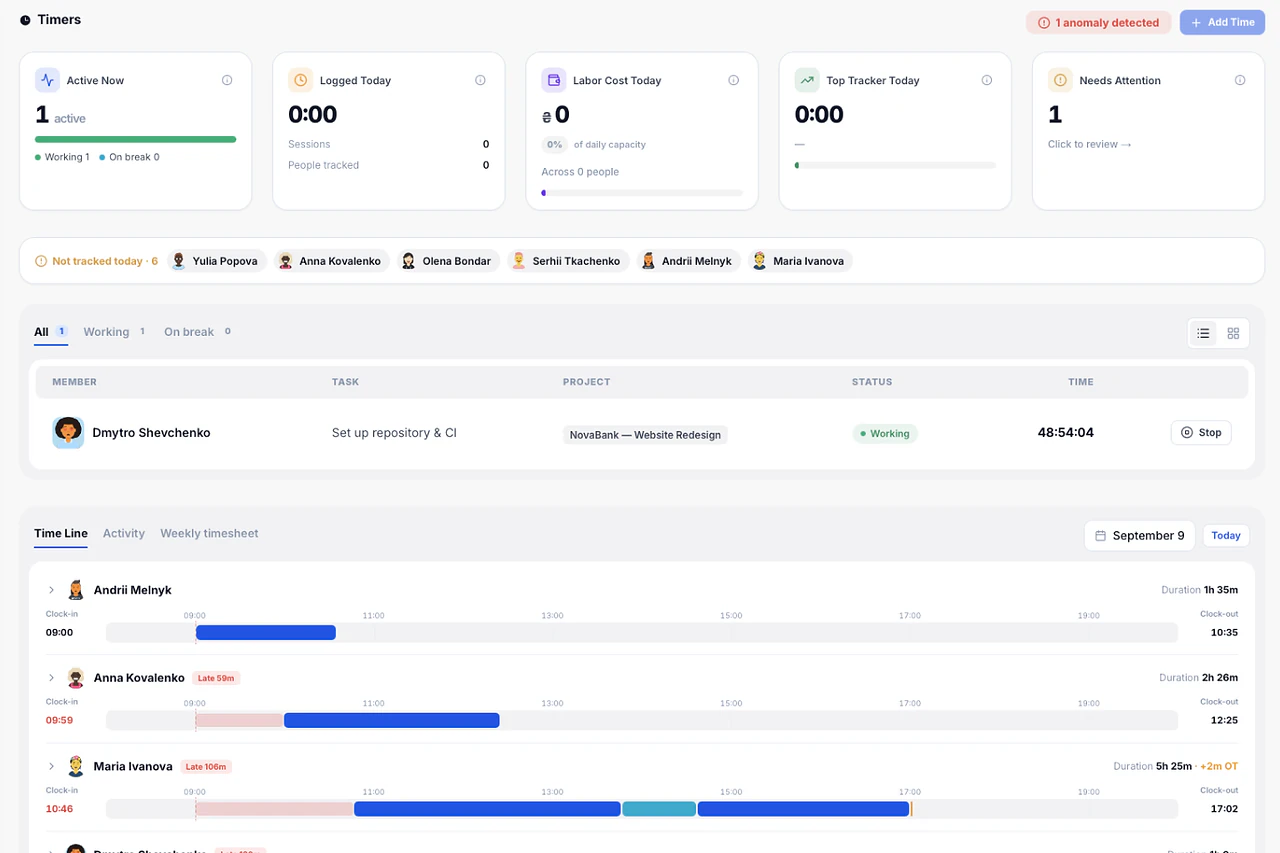
Stop forcing your team to juggle external timer apps. Melororium embeds live stopwatch counters directly into every task card so every second logs itself automatically.

TRACKING PENALTY
Recording billable minutes shouldn't cost recurring cash.
Running isolated stopwatches outside your main environment accumulates a silent software tax. Secure your full tracking stack with one flat monthly fee.
The SaaS Tax
Here is what you are paying every year to run a fragmented workflow:
Cumulative SaaS Tax vs. Flat-Fee Subscription
Equivalent to saving hundreds of tracked hours from being leaked into third-party subscription fees.
EFFICIENCY MATRIX
Capture commercial minutes without micromanagement.
Keep your payroll perfectly balanced. Let your specialists log time right where they work while the database handles the math.
Resource Rate Configuration
Anchor exact employee costs per hour into the directory to establish automated base financial calculations.
Task-Embedded Stopwatch Activation
Trigger real-time tracking counters natively inside task cards to eliminate separate stopwatch utilities.
Live Chronological Activity Logging
Review a running timeline of team logs, specific task titles, employee names, and precise time intervals.
Team Payroll Consolidation
View an automatically updated summary directory computing accumulated earnings and total hours per developer.
VALUE COMPARISON
Why pay per seat when you can go flat-fee?
Compare face-to-face. Other SaaS platforms lock your workflows and data behind endless per-seat fees. We believe professional software should be a flat fee for your whole team.
The old way
Paying monthly subscription taxes for every minor tool you use.
Scattered operational records causing workflow gaps and missed hours.
Heavy, sluggish cloud interfaces wasting your daily billable capacity.
Compiling raw timesheets manually to calculate project margins.
The Melororium way
Flat monthly fee for your whole team. Secure, scalable workspace.
Unified time logging and accounting tied directly to active tasks.
Blazing-fast local-first execution with zero interface latency.
Integrated ledger automation generating live performance reports.
ZERO LOADING SPINNERS
Local-first compilation. Zero server delays.
Melororium compiles all database transactions straight inside your client engine before pushing silent sync tasks to the server.
IndexedDB direct write — zero network dependency
React virtual DOM diff — 1 animation frame
Async worker sync — invisible to the user
Server roundtrip + JSON parse + re-hydrate
LIVE TEST
Run a latency benchmark
Simulate a real workspace action and measure local vs remote execution time.
Click run to measure local performance.
EARLY FEEDBACK
See what teams say about Melororium.
Early adopters from agencies and studios share how ditching the subscription stack changed how their teams operate.
Clara Moss
Founder, Mossglow Studio
"I had a successful shop and absolutely no idea if I was actually making money."
Tom Brauer
Founder, Linkframe
"I was paying to make my own life harder."
Marcus Webb
Founder, North Signal Studio
"Every Friday felt like an archaeology dig."
Built for modern digital operations.
Join the early adopters scaling their business layout with Melororium.
PRODUCT FAQ
Frequently
Asked Questions
Have a question that needs a human to answer?
No problem, email us at support@melororium.com
Compare alternatives
Starter ($29/mo) covers up to 4 users — ideal for small teams. Agency ($59/mo, most popular) covers up to 10 users and lets you pick 5 additional modules on top of the 12 core ones. Studio ($119/mo) covers up to 25 users and unlocks all 20+ announced modules. All plans are billed monthly or yearly (save ~30% annually).
Switch plans anytime — your data stays intact and the transition takes seconds. Upgrade is prorated automatically. No lock-in, no penalties for growing your team.
With per-seat tools, every new hire costs more. A 10-person team on ClickUp pays $1,440/yr in seat fees alone. Melororium charges one flat monthly fee for your whole team — add 1 person or 10, the price stays the same. No seat tax that eats into your margins as you grow.
Security is non-negotiable. Melororium operates on end-to-end data encryption (TLS 1.3) with enterprise-grade database separation. Our AI features use strict Bring Your Own Key (BYOK) architecture — your data is never used for model training.
Yes. Melororium supports dedicated Client Portals at no extra cost. Clients can view project timelines and download deliverables. Guest client access does not count against your team seat limit.
Every plan includes: Dashboard, Kanban, Projects, Calendar, Team management, Client CRM, Invoices, Work Reports, Live Timers, Inbox, Time Tracker, and Settings. Agency and Studio plans add extra modules on top of these.
Billable Hours Management for Teams: Time Tracking, Reporting, and Invoicing Without Per-Seat Fees
For service businesses that bill by the hour — consulting firms, legal teams, creative agencies, IT support companies — accurate time tracking is not a nice-to-have. It is the mechanism by which revenue is captured. Every hour logged is a dollar billed. Every hour missed is revenue lost permanently. This guide explains how Melororium is built specifically for hourly billing teams, why integration between time tracking and invoicing matters, and how flat-fee pricing changes the economics of managing a billable-hours business.
Why Separate Time Tracking and Invoicing Tools Cost You Money
The standard setup for an hourly billing business involves at least two tools: a time tracker (Toggl, Harvest, Clockify, Time Doctor) and an invoicing tool (FreshBooks, QuickBooks, Wave, or a standalone invoicing app). The workflow looks like this: team members log time in the tracker, at the end of a billing period someone exports the time data, imports or manually enters it into the invoicing tool, builds the invoice, reviews it for accuracy, and sends it. This manual reconciliation process is where billing errors are born. A team member logs time to the wrong project, and it gets billed to the wrong client. An export misses a session. Hours are accidentally double-counted. A client disputes a line item and the PM has to reconstruct the time log from two separate systems. These errors are not rare — they are structurally inevitable when time and billing live in different places.
The True Cost of Manual Billing Reconciliation
Studies of professional services firms consistently find that billing administration consumes 3–6% of total team capacity. For a 10-person team billing at $100/hour average, 4% of capacity is 80 hours per month — $8,000 in staff time spent on administrative overhead. Moving to an integrated time-and-billing system typically reduces that overhead by 60–80%. At Melororium's $59/month Agency plan, the monthly ROI calculation takes about 20 seconds.
How Melororium Handles Hourly Billing End-to-End
Melororium's time tracking is embedded inside every task. Team members open a task, click the timer, and begin working. The timer runs until they click stop. The session is logged against the task, the project, and the client — automatically, with no manual attribution required. At any point, the Work Reports module shows a live view of hours logged: by team member, by project, by client, by date range. Billing rates are set at the client level or the team member level. Melororium calculates the billable total automatically and generates a PDF invoice from the report — line items, hours, rates, totals, and your branding — in one action.
Live Timer Monitoring for Team Leads
For teams managing multiple simultaneous client projects, knowing whether the right people are working on the right things in real time matters. Melororium's Live Timers view shows which team members have active timers running right now, on which tasks and which projects. A project manager can spot at a glance if someone is working on a low-priority task when a high-priority deadline is approaching — without interrupting them with a Slack message.
Billing Rate Configuration
Melororium supports flexible billing rate configuration. Set a default rate per client, override it per project, or set individual rates per team member. A senior consultant might bill at $200/hour while a junior analyst bills at $80/hour — both can be logged and invoiced from the same workspace with the correct rates applied automatically. This flexibility covers the billing structures of most professional services businesses without requiring custom configuration.
Melororium vs. Harvest for Hourly Billing Teams
Harvest is the most widely used dedicated time tracking tool for professional services teams. It charges $14 per seat per month — $1,680/year for 10 users. Harvest does not include project management, CRM, or invoicing beyond basic billing (it integrates with Stripe for payment collection but does not generate detailed PDF invoices natively). Melororium at $59/month includes time tracking comparable to Harvest in accuracy and flexibility, plus project management, client CRM, PDF invoice generation, and work reports. The $1,680/year Harvest bill disappears into Melororium's $708/year flat fee — and the manual reconciliation between Harvest and your project management tool disappears with it.
What Harvest Users Miss When Switching
Harvest has excellent Stripe integration for payment collection and a clean mobile app for on-the-go time logging. If your team frequently logs time from mobile devices outside a browser environment, evaluate Melororium's mobile experience during your 14-day demo. For teams that log primarily from desktop during project work, Melororium's embedded timer approach is faster and more accurate than switching to a separate mobile app.
Setting Up Billing Rates and Reports for a New Client
Adding a new client to Melororium takes under 10 minutes. Create a CRM record with contact details, set the billing rate (hourly or project-based), and create a project linked to the client record. Assign tasks, invite any team members who will work on the account, and you are ready to track time on day one. At the end of the first billing period, open Work Reports, filter by this client, set the date range, and review the time log. Adjust any entries if needed (Melororium allows manual time edits with an audit trail), set the invoice date, and generate the PDF. The client receives an itemised invoice that matches exactly what was tracked — no estimation, no rounding, no guesswork.
Capture every billable second automatically.
No forgotten logs, no manual exports, no billing disputes. Native timer infrastructure built directly into your workspace.