MELORORIUM FOR CREATIVE TEAMS
Plan campaigns, track revisions, and bill clients from one flat-fee workspace.
Melororium gives creative teams of 4 to 25 people a shared content calendar, client CRM, and PDF invoicing under one login, for one monthly price.
14-day free demo. No credit card required.
How creative teams use Melororium
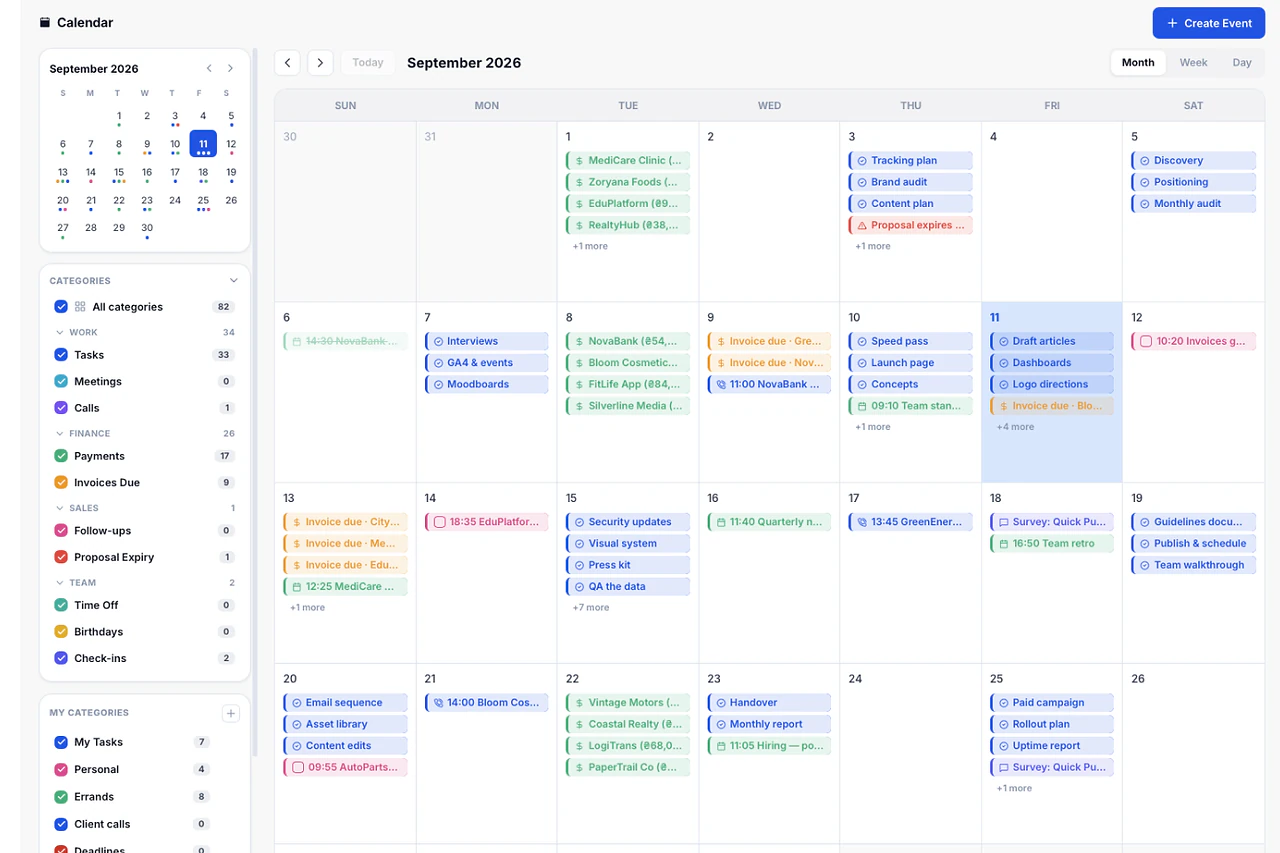
Plan every post and deliverable in one calendar
See tasks, payments, and deadlines across every client campaign in a single view.
- Shared calendar for the whole team
- Deadlines linked to real tasks
- No separate content calendar tool
Features
Features for creative teams
One price for the whole studio
Add a designer or an editor to the Agency plan without a new line item on your bill.
Shared content calendar
See every client's posting schedule and deadlines on one calendar instead of five spreadsheets.
Client status pages, no login required
Share a live project page so clients check on a campaign without emailing you first.
Version history on every project
Roll a project back to an earlier state after a client asks for the previous direction.
Deadline alerts before they slip
Get notified when a deliverable is due soon, not after the posting window passes.
Time tracking on creative work
Log hours per task to see how long a campaign or design round takes.
Proposals that become projects
Send a branded proposal and the project sets itself up the moment it's signed.
Built for creative teams
Run the whole studio on one flat monthly fee.
The Agency plan covers 15 users and 9GB of storage for $59/month, with Smart Templates and Budget Guardian included for repeatable creative workflows. Studios of up to 25 people move to the $119/month Studio plan.
$59
per month, whole studio
15
users included
9GB
storage included
Ready-made solutions for creative team processes
More templatesDesign Studio Project Tracking
Track design briefs, revisions, and client sign-offs in one board
SMM Agency Project Management
Manage 10+ social media clients without losing your mind
SMM Content Calendar
Plan, assign, and track every post across all channels — in one calendar
Content Production Workflow
From brief to published — every content piece tracked through production
Creative Brief Template
Capture the brief, assign tasks, and track revisions — start to delivery
SMM Monthly Report
Send a professional monthly report to every social media client in minutes
Social Media Posting Schedule
A weekly and monthly posting schedule across all platforms — always visible
Client Feedback Template
Capture, log, and act on every piece of client feedback without losing it
Other ways creative teams use Melororium
Managing multiple social clients
Keep 5 or more client accounts organized without losing track of what's due when.
Sending monthly client reports
Generate a report on what shipped and what's scheduled next, without building it by hand.
Tracking revision rounds
See how many rounds of feedback a project went through before it shipped.
Collecting creative briefs
Send a structured intake form so a project never starts with missing information.
Scheduling shoots and calls
Let clients book a shoot or a review call through a public booking page.
Watching studio capacity
See which designer or editor has room before promising a new deadline.
Storing brand assets
Keep logos, fonts, and brand files attached to the client record, not in a shared folder no one can find.
For adjacent teams and processes
Useful reading for creative teams

How SMM Agencies Manage Content for 5+ Clients Without Burning Out
Content calendars, approval cycles, revisions, posting, reporting — multiplied by five clients. Here's the operational system that makes it sustainable.
Read article
How to Use AI to Write Social Media Captions 10x Faster (Without Sounding Like a Robot)
The problem with AI captions isn't that they're fast — it's that they're generic. Here's the system that keeps the speed and adds back the specificity that makes captions actually work.
Read articleMelororium blog
Guides, playbooks and real agency numbers, every week.
Go to the blogFrequently
Asked Questions
Have a question that needs a human to answer?
No problem, email us at support@melororium.com
Yes. The Calendar module shows tasks, deadlines, and payments across every client campaign in one shared view, so nothing gets missed when you're managing five or more accounts.
Canvas keeps the brief and notes attached to the project, and Project History lets you roll back to an earlier version if a client asks for a previous direction. Both stay in the same workspace as the task board.
Work Reports generates a matrix of project, person, and hours that you can export as PDF or Excel, so a monthly client report takes minutes instead of an afternoon.
Yes. Drive attaches files to the specific project they belong to, with access controlled per client, so a designer isn't hunting through a shared folder for the final version.
The Agency plan covers up to 15 users and 9GB of storage for $59/month, with Smart Templates and Budget Guardian included, which covers most small creative studios with room to grow.