How AI Is Changing Freelance Work in 2026 — What to Automate First
The freelancers thriving in 2026 aren't the ones ignoring AI or the ones terrified of it. They're the ones who figured out what to delegate to it — and what to protect.

Contents
One flat fee for the whole team
Tasks, timers, CRM and invoices in one workspace. From $29 a month, no seat tax.
Start free demo14 days · no credit card
01. The Real State of AI for Freelancers in 2026
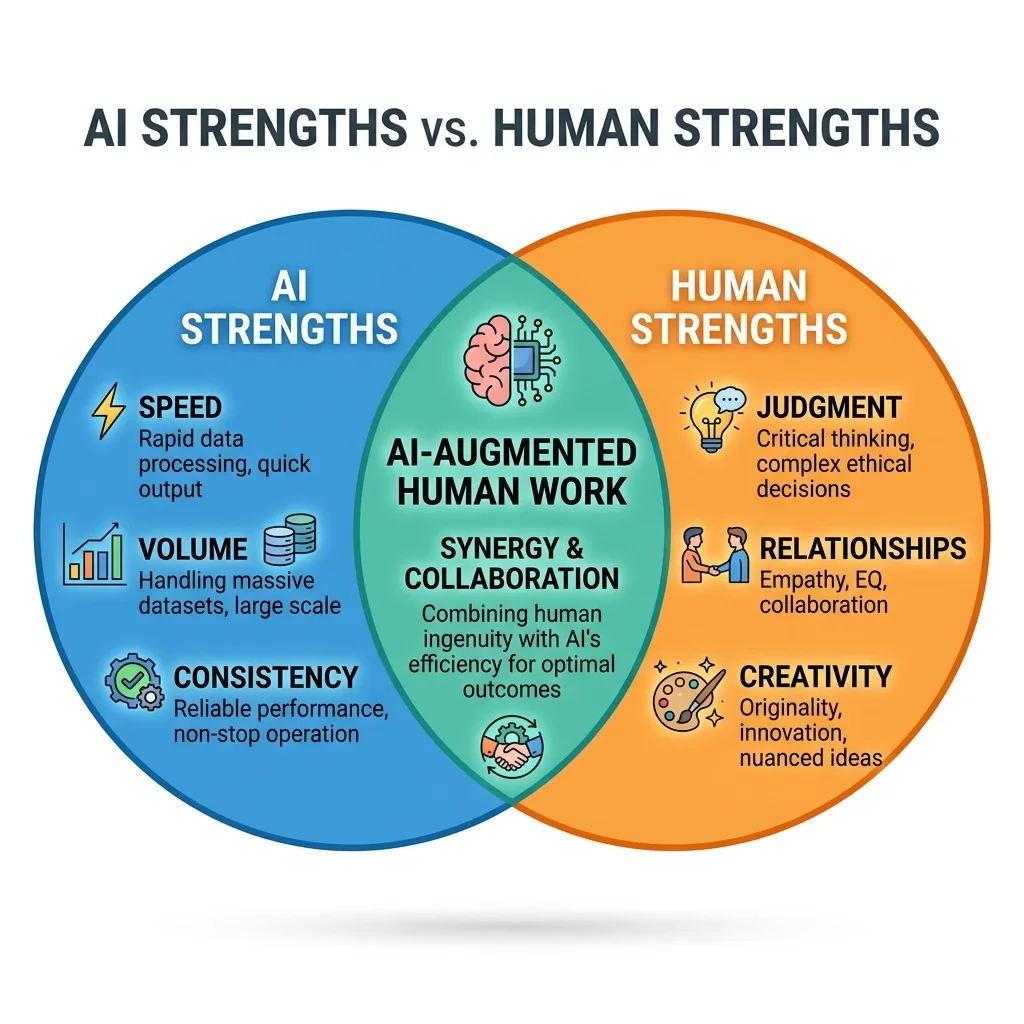
Two years ago, the conversation about AI and freelancing was mostly theoretical. In 2026, it's operational. AI tools are embedded in the daily workflows of the majority of working freelancers — and the gap between those who've integrated them effectively and those who haven't is widening visibly in output volume, quality, and rates. The fear narrative — 'AI will replace freelancers' — has been replaced by a more nuanced reality. AI has replaced some entry-level freelance work. It has dramatically amplified the output of mid-to-senior level practitioners. And it has created entirely new categories of work that didn't exist two years ago. The freelancers at risk aren't the ones with deep expertise. They're the ones whose value proposition was execution speed and volume at the expense of judgment and taste — two things AI still doesn't have.
"I use AI for the first 60% of almost everything I do now. The last 40% — the judgment, the client relationship, the specific contextual intelligence — that's still entirely mine. My output has doubled. My rates have increased."
— Freelance brand strategist, 6 years independent
02. What AI Is Actually Good At (Honest Assessment)
First drafts and initial structures AI produces competent first drafts at high speed. Not great first drafts — but solid starting points that save 40-60% of the time required to produce something worth editing. Research and synthesis Summarising large amounts of information, identifying relevant data points, synthesising multiple sources into a coherent overview. Tasks that previously took hours of reading take minutes of prompting. Repetitive variations Generating ten subject line options, five headline variations, multiple layout concepts. AI is far faster than a human at producing quantity — which makes it a tool for expanding creative exploration cheaply. Administrative and communication tasks Drafting routine emails, summarising meeting notes, creating standard documents from templates, generating initial proposals from briefs. All of these are now significantly faster with AI assistance. Code generation and technical work For developers, AI code assistance has compressed routine coding tasks dramatically. Boilerplate, documentation, debugging, code review — the productivity gains for technical freelancers are among the most significant in any discipline.
03. What AI Is Still Bad At — Your Competitive Moat
Understanding where AI fails is as strategically important as understanding where it succeeds. These are the capabilities that justify premium rates in 2026: Contextual judgment AI doesn't know your client's history, their internal politics, their unspoken constraints, or the emotional undercurrent of their business situation. Applying judgment that accounts for all of these is a human skill. Taste and aesthetic discernment AI produces work that is technically correct and statistically average. The choices that make work memorable — the unexpected angle, the distinctive voice, the design decision that breaks the convention correctly — require taste that emerges from experience. Client relationship management Trust is built through consistent human interaction. Clients don't pay premium rates for outputs — they pay them for the security of working with someone they trust to handle their business with care. Novel problem-solving AI is very good at applying known patterns to new situations. It is poor at recognising when a situation falls outside existing patterns and requires genuinely new thinking.
04. The Five Categories of Freelance Work to Automate First
Category 1: Research and competitive analysis AI tools can now compress what was a half-day research task into 30 minutes. Use them to gather context, identify competitors, and synthesise industry background — then apply your own judgment to the analysis. Category 2: First drafts Any content that goes through multiple drafts anyway — copy, proposals, reports — benefits from starting with an AI draft that you refine rather than a blank page you fill. Category 3: Routine communications Standard client emails, proposal structures, project summaries, meeting agendas — all templatable and AI-assistable. Category 4: Documentation Project briefs, scope documents, process guides, meeting notes — AI handles the structure, you supply the content. Category 5: Repurposing and reformatting Converting a report into a presentation, a long-form article into five social posts, a video transcript into a blog post — AI does the reformatting, you do the quality control.
05. AI for Content and Copywriting Freelancers
Content and copywriting was predicted to be the discipline most threatened by AI. In practice, the outcome has been more complex. AI has reduced demand for low-differentiation content work (generic blog posts, basic product descriptions). It has increased demand for high-skill content work (strategic content, distinctive brand voice, editorial judgment). What to automate in content work:
- Research phases — competitor analysis, topic research, source gathering
- Structural outlines — AI produces content structures quickly, you refine them
- First draft generation — use AI for speed, apply voice and judgment in editing
- SEO metadata — titles, descriptions, tags
06. AI for Design and Creative Freelancers
Design AI has matured significantly. Image generation, variations, background removal, layout suggestions, and style exploration are now AI-assistable in ways that save hours on production work. What to automate in design work:
- Concept exploration — generating multiple directions quickly to show clients before committing
- Asset variations — resizing, reformatting, adapting designs for different platforms
- Stock and reference gathering — AI-assisted image research and mood boarding
- Presentation formatting — AI tools for slide structure and visual layout
07. AI for Development and Technical Freelancers
Development has seen the most dramatic AI productivity gains of any freelance discipline. AI code assistants (GitHub Copilot, cursor-based tools) have become standard equipment for the majority of working developers. What to automate in development work:
- Boilerplate code generation — scaffolding, standard patterns, configuration files
- Documentation — function documentation, API documentation, README files
- Debugging assistance — AI code review surfaces issues faster than manual review
- Testing — test case generation for standard coverage scenarios
Flat fee · no seat tax
Ready to get started?
Melororium integrates with Gemini AI and gives your team a task management and timer system for the non-AI work that keeps everything running. One payment, forever.
Starter: $29/mo (4 users)
Agency: $59/mo (15 users)
08. AI for Consultants and Strategic Freelancers
Strategic consultants were assumed to be among the least affected by AI — the work is too judgment-based, too relationship-dependent. In practice, AI has become a significant productivity amplifier for strategic work, primarily in research, analysis, and communication. What to automate in consulting work:
- Market research synthesis — AI dramatically compresses research time
- Report and presentation structure — frameworks and structures generated quickly, filled with original analysis
- Proposal generation — standard proposal structures with project-specific content
09. Building Your Personal AI Workflow
The most effective AI practitioners don't use AI reactively — they build structured workflows that integrate AI at specific points in their process. The workflow design process: 1. Map your current work process step by step — what happens from brief to delivery? 2. Identify steps that involve research, drafting, formatting, or repetitive variation 3. Test AI assistance at each of those steps — quantify the time saving 4. Build the AI-assisted version into your standard process 5. Protect the steps that require judgment, taste, and relationship — these stay human Melororium integrates with Gemini AI natively — manage your AI-assisted work tasks alongside your project management in one workspace URL: melororium.com
10. How to Tell Clients About Your AI Usage
Most clients don't ask. Of those who do, the majority are fine with AI assistance if the quality standard is maintained and the value is clearly in the human judgment applied, not just the AI output. The honest framing: 'I use AI tools to accelerate the research and draft stages of my work. All final decisions, quality control, and strategic judgment are mine. This allows me to produce better work faster — which is why my output quality has improved over the past year.' Clients paying for outcomes, not process, generally respond well to this.
11. The Skill That AI Makes More Valuable, Not Less
As AI handles more of the execution layer of knowledge work, the skill that appreciates in value is curation and judgment — the ability to evaluate AI output, identify what's good, what's wrong, and what's missing, and to elevate raw material into something excellent. Taste. Editorial judgment. Strategic thinking. Client relationship intelligence. These are the skills that become more, not less, valuable as AI handles more of the baseline execution.
12. Future-Proofing Your Freelance Practice
The freelancers who will thrive in 2027 and 2028 are building practices organised around judgment and relationship rather than volume and execution speed. They're using AI to amplify their output now, while investing the time saved in deepening their expertise and their client relationships. The sustainable strategy: become very good at using AI, and become irreplaceable at the things AI can't do.
13. You don't need AI agents to manage your tasks — you need ownership.
In 2026, a new category of tools is emerging: AI-native project management. Joka.work positions itself as 'ticketmaxxing to replace Jira in the agentic era.' TaskFlow AI hit 342 votes on Product Hunt with AI-generated subtasks and autonomous sprint planning. Here's the reality for most freelancers and small teams: you don't have a complexity problem. You have an ownership problem. AI agents are designed to manage enterprise-scale engineering workflows — Jira boards with hundreds of tickets, automated sprint ceremonies, AI triaging incoming bug reports. For a freelancer with 8 active clients and 40 tasks, this is solving the wrong problem expensively. What you actually need: — One place for your tasks (not an AI planning them for you) — Your time tracked where work happens — Your clients visible in one view — A flat price that doesn't climb every time they ship an 'AI feature' The 'agentic era' is real for large engineering teams. For independent freelancers and small agencies, ownership beats AI agents every time. You know your work better than any model does. The tool's job is to get out of your way — not to plan your day.
Boards that run themselves
Kanban with subtasks, priorities and a timer on every card
Demo request from Bloom Cosmetics
Website redesign · due Oct 14