Your Team Misses Deadlines Because Notifications Go to Slack. Here's the Fix
A Slack message gets read, acknowledged, and forgotten. A task @mention lives next to the work it belongs to. Here's why context-attached notifications change how teams actually respond.
Contents
One flat fee for the whole team
Tasks, timers, CRM and invoices in one workspace. From $29 a month, no seat tax.
Start free demo14 days · no credit card
01. The Notification Problem That Causes Most Missed Deadlines
When a project manager asks why a deadline was missed, 'I didn't see the notification' is one of the most common honest answers — and one of the most frustrating to hear, because the notification was sent. It went to Slack. It was technically received. It just didn't result in action. The failure isn't the person who missed the notification. It's the system that sent a notification divorced from its context into a stream of forty other messages, where it competed with everything else in that channel for attention and lost.
"We had a Slack integration for every tool we used. Our channel had 300 messages a day. Nobody was reading the notifications anymore — they were noise. The missed deadlines followed."
02. How Slack Became the Default Notification Layer
Slack became the de facto notification layer for most small teams not because it's the best tool for task notifications, but because it's where the team already lives. When ClickUp or Asana sends a notification, the path of least resistance is to have it go to the Slack channel where everyone is already paying attention. The result is a channel that receives task updates, status changes, deadline reminders, @mentions, client messages, team conversation, and the occasional off-topic message — all in one undifferentiated stream.
03. What Happens to a Slack Notification in a Busy Channel
The lifecycle of a task notification in a busy Slack channel: it arrives, it gets glanced at, it gets scrolled past, it gets buried under the next twenty messages. By the time it becomes relevant — when the deadline is actually approaching — it's gone from anyone's active awareness. The notifications that get acted on consistently in Slack are the ones that generate an immediate response in the moment they arrive. The ones about tasks due in three days, or reviews needed this week, or approvals the project is waiting on — these have the wrong timing for Slack's psychology.
"We had a Slack integration for every tool we used. Our channel had 300 messages a day. Nobody was reading the notifications anymore — they were noise. The missed deadlines followed."
— Project lead, 8-person content agency
04. The @Mention That Lives With the Work
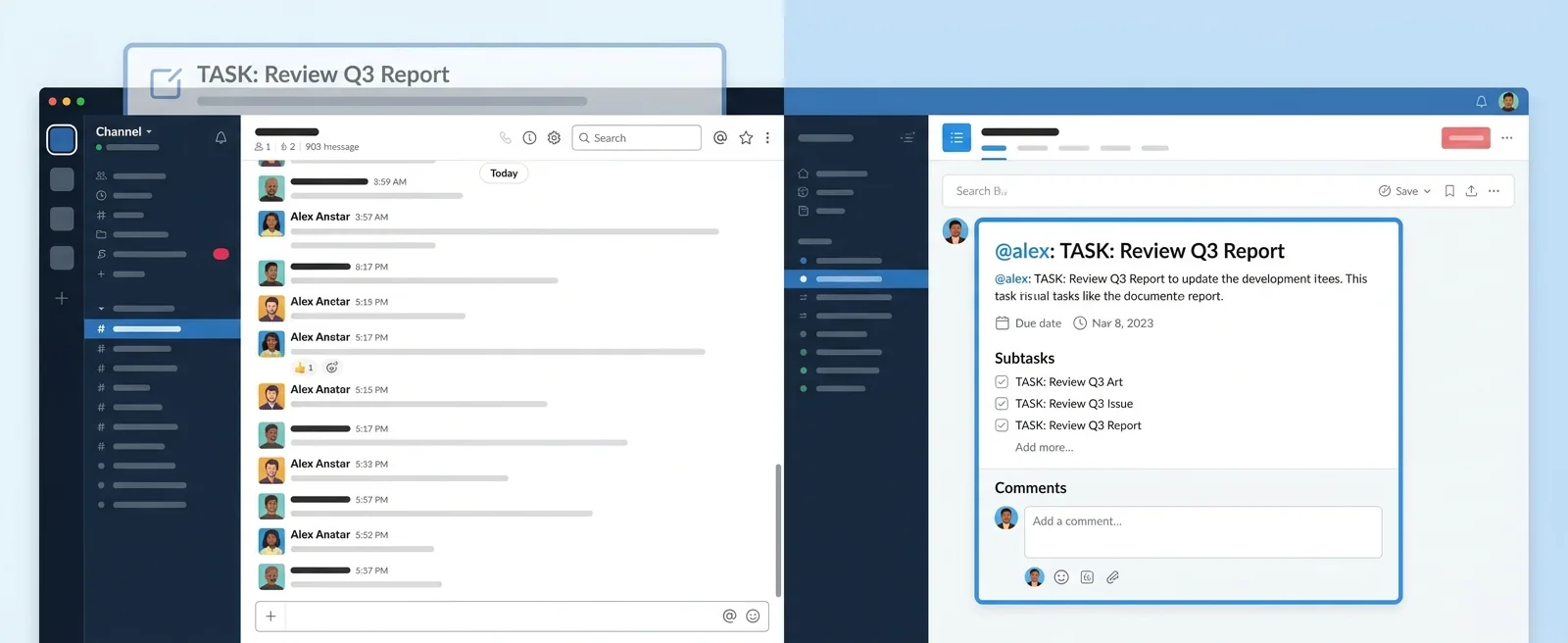
A task @mention works differently from a Slack notification because it lives in the same place as the work it refers to. When someone @mentions you on a task in Melororium, the notification isn't a message in a stream — it's an alert attached to the specific task, with the full context of that task immediately visible when you open it. You don't see '@person mentioned you in #general-updates — [brief truncated text].' You see the task, the current status, the deadline, and exactly what the mention said. The action required is clear from the notification itself, not something you have to reconstruct from a Slack thread.
Melororium
@Mentions + Inbox — Context-First Notifications
Melororium @mentions and Inbox — task-contextual notifications that live next to the work, filtered to only what requires your action.
Flat fee · no seat tax
No more missed deadlines buried in Slack.
Task notifications that live next to the work — @mentions, filtered inbox, deadline flags. Try free for 14 days.
Starter: $29/mo (4 users)
Agency: $59/mo (15 users)
Studio: $119/mo (Unlimited users)
05. The Inbox That Only Shows What Needs Action
Melororium's Inbox is built on a specific design principle: it shows only the notifications that require an action from you. Not every task update. Not every comment. Not every status change. The things that need your response or decision — @mentions, approval requests, deadline flags on tasks you own. The difference between this and a Slack channel is the filter. Your Inbox is pre-filtered to the things that require you. A Slack channel is everything for everyone, requiring you to do the filtering yourself in real time.
06. What Changes for the Team
Team members stop missing notifications because the notification context makes the required action obvious. There's no 'I saw the Slack message but wasn't sure what I was supposed to do.' The task is right there, with the status, the deadline, and the specific mention that's asking for something. The reduction in 'did you see my message about X' follow-up messages is the metric most teams notice first. Those messages exist because the original notification didn't reliably produce action.
07. What Changes for the Manager
Managers stop chasing status updates through Slack threads. Instead of 'has anyone looked at the client brief yet?' in a channel where it may or may not get seen, the @mention is attached to the brief task, visible in the assignee's inbox, with the deadline visible. When the status changes, the manager sees it without having to ask.
08. Setting Up Notifications That Actually Get Acted On
The practical setup: keep Slack for team conversation and client communication — it's genuinely good at that. Use Melororium's @mentions and Inbox for task-related notifications — deadline alerts, approval requests, feedback needed, work ready for review. The two tools serve different communication functions, and routing the right notifications to the right place resolves the context-loss problem that causes missed deadlines.
Boards that run themselves
Kanban with subtasks, priorities and a timer on every card
Demo request from Bloom Cosmetics
Website redesign · due Oct 14