How Agencies Send Invoices Without Manual Entry — Timer to Invoice in 2 Steps
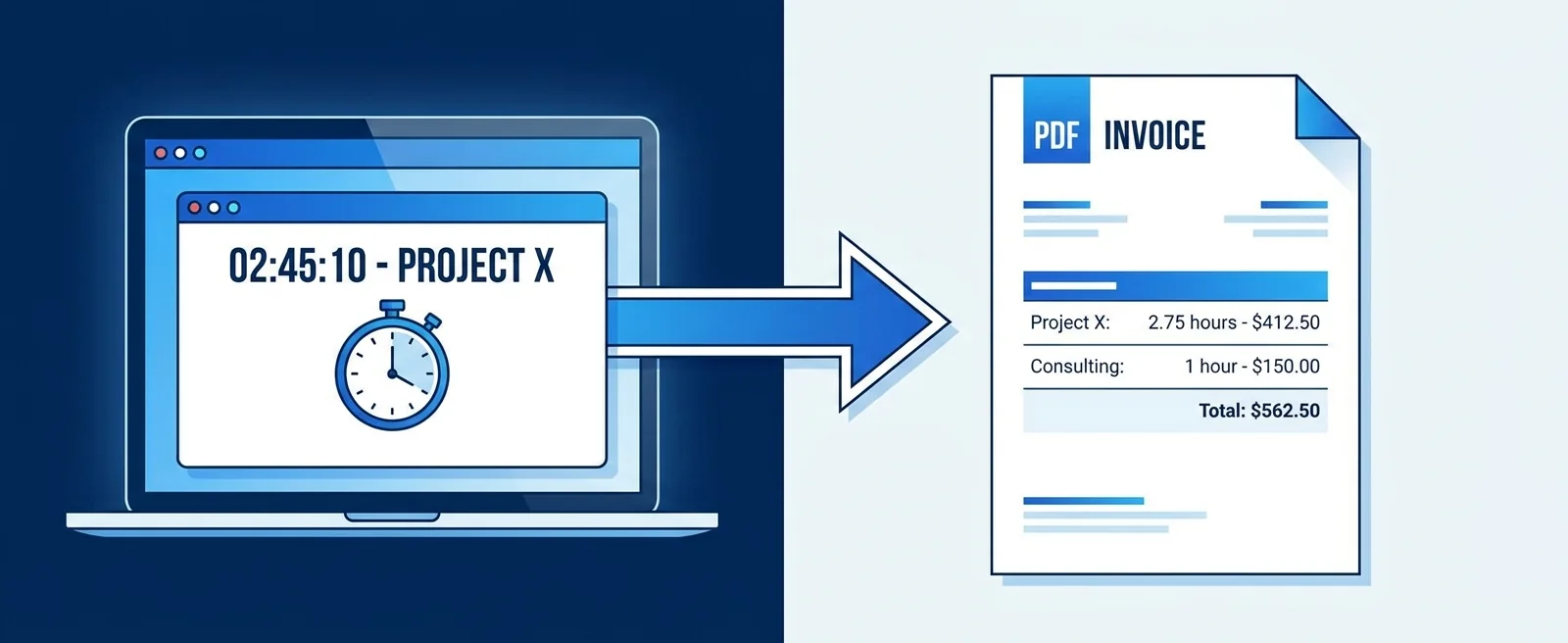
Start a timer on a task. Stop it when you're done. Export a work report, generate the invoice PDF, send to client. Zero manual entry. Here's the exact workflow.
Contents
One flat fee for the whole team
Tasks, timers, CRM and invoices in one workspace. From $29 a month, no seat tax.
Start free demo14 days · no credit card
01. Why Agency Invoicing Is Usually Based on Guesses
Ask an agency owner how they calculate the hours on a client invoice and the honest answer is usually some variation of: we track loosely, estimate the rest, and try to stay roughly in line with the retainer or project scope. The invoice reflects a negotiated number more than a measured one. This works until it doesn't. It works until a client questions a line item and you can't substantiate it. It works until you finish a project and realise you're invoicing for 40 hours of work that actually took 65. It works until the 'standard 20 hours/month retainer' has been running at 31 hours for three months and nobody noticed.
"Most agencies send invoices based on memory, estimates, or a Friday afternoon of backfilling hours from calendar entries. Here's the workflow that ends that."
02. The Standard Broken Workflow (And Why It Persists)
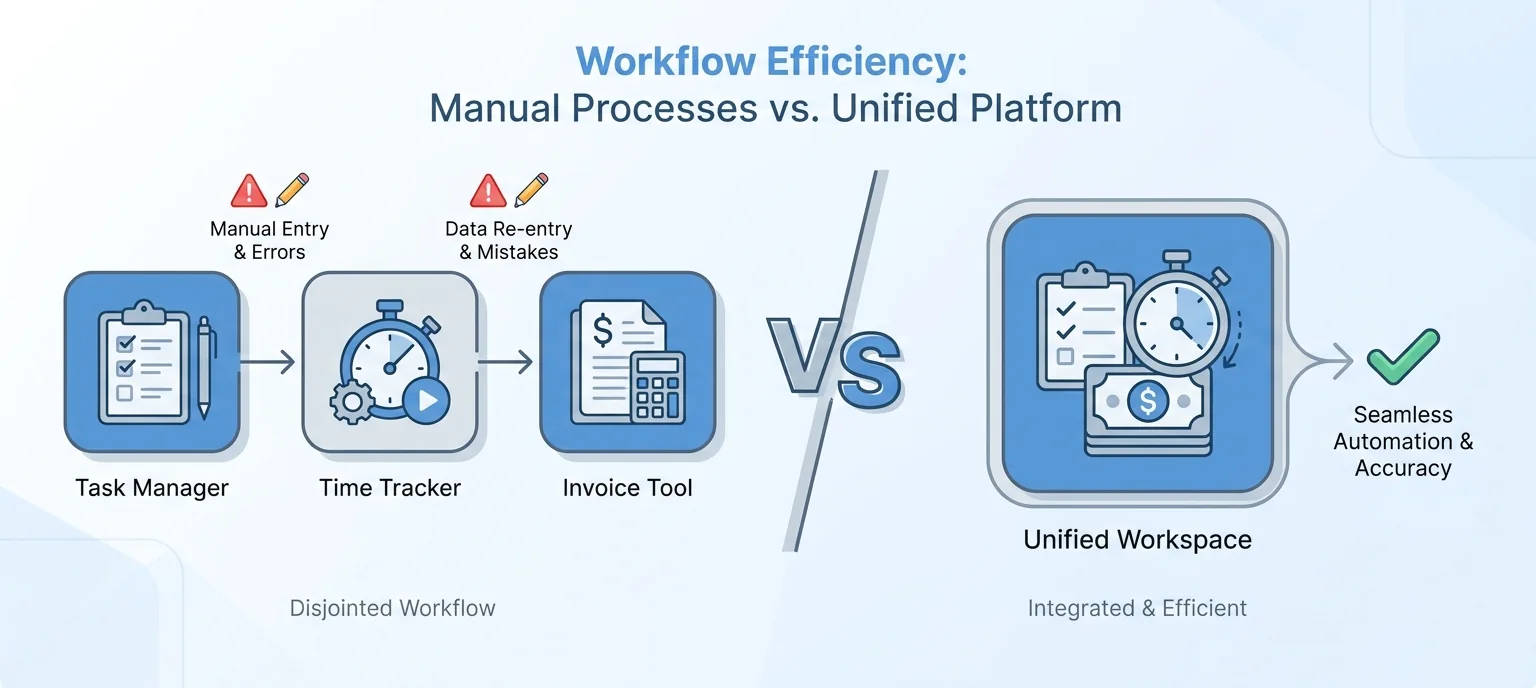
The current workflow at most agencies: work happens in one tool (ClickUp, Asana), time gets tracked inconsistently in a second tool (Toggl, Harvest), invoices get built manually in a third tool (FreshBooks, Xero) by someone who is reconciling the first two while trying to hit the billing deadline. This workflow persists because each individual tool is good at its specific job. The problem isn't the tools — it's the seams between them where data has to be manually transferred and where errors are introduced and where hours go missing.
03. The 2-Step Workflow: Timer to Invoice
The workflow that eliminates manual entry has two steps. Neither requires switching tools, neither requires reconciling data from multiple sources, and neither produces an invoice that's based on anything other than actual measured time.
04. Step 1: Track Time Inside the Task
Every task in Melororium has a built-in timer. You open the task — the one the work is actually happening on — and click start. The clock runs against that specific task. When you stop working, you stop the timer. The hours are logged against the task automatically, attached to the project and the client. No switching to a second app. No typing a project name from memory. No end-of-day reconstruction. The timer is where the work is. When your whole team works this way, the time data for every client is always current, always task-specific, and always available for the next step.
Flat fee · no seat tax
Try the timer-to-invoice workflow with your real clients.
See what your actual hourly rates look like — and never build a manual invoice again.
Starter: $29/mo (4 users)
Agency: $59/mo (15 users)
Studio: $119/mo (Unlimited users)
05. Step 2: Work Report to Invoice PDF
When it's billing time, you open the Work Report for the client. The report pulls every hour logged against their projects for the selected period. Every task, every team member, every minute tracked is in that report. You review it — takes two minutes, not two hours — and generate the invoice directly from the report. Line items populate automatically from the task data. The total reflects the actual hours. The invoice PDF is ready to send.
Melororium
Timers + Work Reports + Invoice Generator
Melororium — the complete timer-to-invoice workflow in one workspace. No tab-switching, no manual entry.
06. What Changes for the Client
Clients receive invoices that are backed by data they can request if they ever want to see it. A line item that says 'Brand Identity — 22.5 hours at $120/hr' came from 22.5 actual logged hours across 14 tasks over four weeks — not from a round number that felt approximately right. Most clients never ask for the underlying data. But the confidence that comes from knowing it exists changes how invoice conversations feel — for both sides.
07. What Changes for Your Margins
The financial effect of moving from estimated to tracked invoicing typically goes in one direction: upward. Agencies that make this switch consistently discover they have been systematically under-billing — not dramatically, but consistently. Tasks that run long get invoiced at their estimate. Hours that get absorbed rather than tracked never appear on an invoice. For agencies on retainers, the work report reveals immediately when a client is consuming more than their retainer covers.
08. Common Objections Answered
Our clients pay fixed fees, not hourly: Track hours anyway. Fixed-fee projects with tracked hours tell you your actual margin per project. After three projects of the same type, you have real data for quoting the next one. Our team won't remember to use the timer: The timer being inside the task is the fix for this. It's not a separate habit — it's one click in the same place the work already happens. We have too many clients to track every task: Even tracking the top three or four task types per client gives you a much more reliable basis for invoicing than reconstructed estimates.
Boards that run themselves
Kanban with subtasks, priorities and a timer on every card
Demo request from Bloom Cosmetics
Website redesign · due Oct 14