How Design Studios Handle Project Management, Client Invoicing, and Time Tracking in 2026
Design studios have specific operational pain: revision rounds, hourly billing, client approvals, and contractor coordination. Here's how studios are structuring their tools in 2026 — and what to look for.

Why Design Studios Have Different Operational Needs
Most project management advice is written generically — for software teams, marketing teams, or whatever audience is broadest. Design studios have a specific combination of operational pressures that generic advice doesn't fully address: work that's genuinely subjective and revision-prone, client approval as a structural bottleneck rather than a formality, and a pricing model that often sits uncomfortably between hourly billing and fixed-fee scope. This matters because the wrong tool setup doesn't just create minor friction for a design studio — it actively works against the specific way creative work gets approved, revised, and billed. A studio using a tool built for engineering sprints will fight the tool every single week.
"Design studios have specific operational pain that generic project management advice doesn't address: revision rounds, hourly-to-fixed pricing tension, and client approval bottlenecks. Here's what's actually working in 2026."
The Three Pain Points Specific to Design Work
Across the design studios we've talked to — including ones using Melororium and ones still evaluating their setup — the same three operational pain points come up consistently, in roughly this order of frequency: revision rounds without defined limits, client approval as an untracked dependency, and the tension between hourly tracking and fixed-fee billing.
Pain Point 1: Revision Rounds That Never End
Design work, more than most knowledge work, invites revision. A logo concept, a layout, a brand direction — these are inherently subjective deliverables, and clients reasonably want to iterate before approving. The operational problem isn't revisions themselves; it's revisions without a defined boundary. Studios that handle this well build the revision limit directly into the task structure, not just into a contract clause that gets forgotten by month two of a relationship. A task for 'Logo Concept v1' that's explicitly scoped to two revision rounds, visible to both the designer and the client-facing project lead, creates a natural checkpoint where the third revision request becomes a conversation about scope rather than an assumed continuation. The tooling implication: your task system needs to support nested revision tracking within a single deliverable, not just a flat task list where 'Logo Concept' appears once and revision history lives in a separate email thread nobody fully reads before responding.
Flat-fee · No seat tax
Done paying per seat? Melororium covers tasks, time tracking, and client CRM for teams of 4–25 — one flat monthly price.
Pain Point 2: Client Approval Bottlenecks
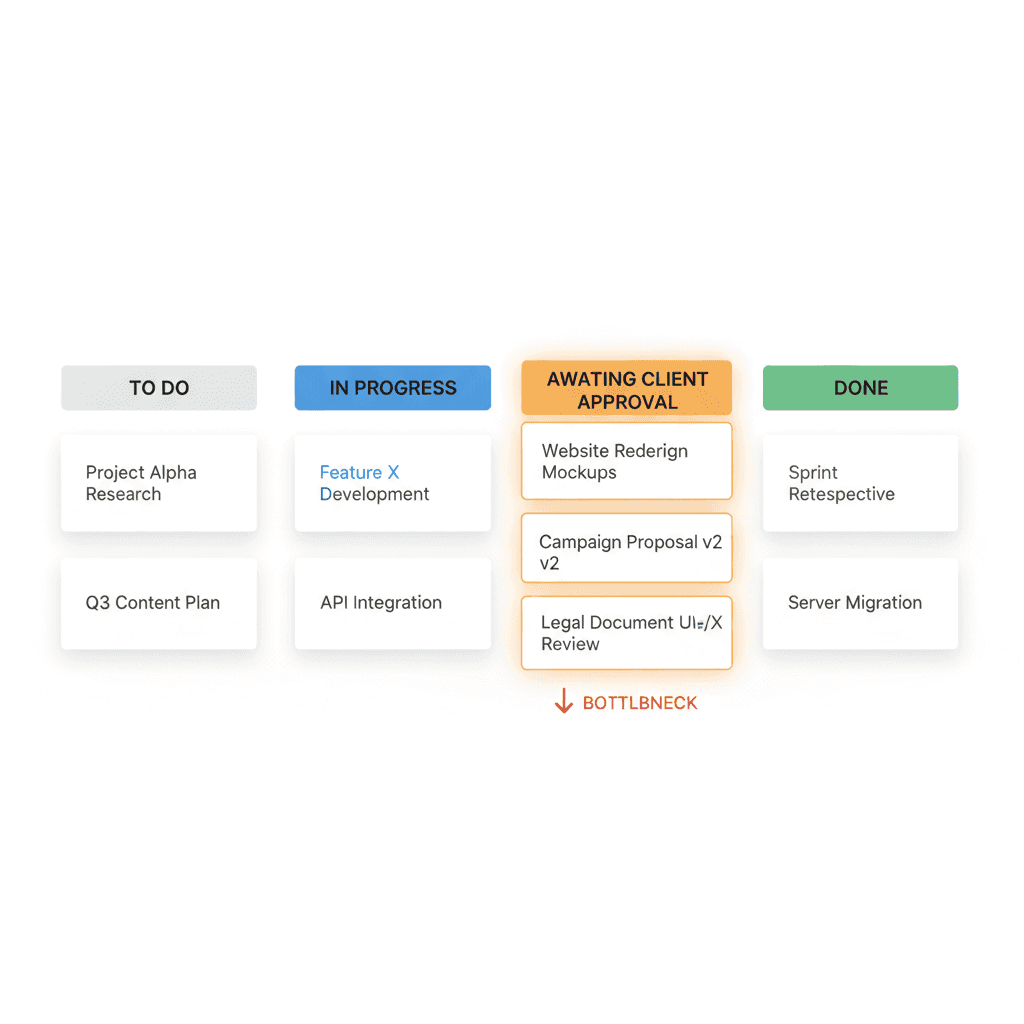
Design work frequently stalls not because the studio is behind, but because a client hasn't approved the previous stage yet. This is a different problem from a studio falling behind on its own deadlines — it's a dependency on an external party's response time, and it needs to be visible as such, not buried inside a generic 'In Progress' status. The studios with the least anxiety around this distinguish, explicitly, between 'we're working on it' and 'we're waiting on the client.' A Kanban column literally labeled 'Awaiting Client Approval' does more operational work than it sounds like it should — it removes the ambiguity about whether a stalled project reflects studio performance or client responsiveness, both internally and in any status conversation with the client themselves.
Pain Point 3: Hourly Billing vs Fixed Pricing Tension
Many design studios price projects as fixed fees for client-facing simplicity, while internally needing to know actual hours spent to understand whether that fixed fee is profitable. This creates a structural need that pure fixed-fee tools don't address well: hours need to be tracked accurately even when the client invoice doesn't itemize them. The studios handling this well track time at the task level regardless of billing model, and treat the hourly data as an internal profitability signal rather than a client-facing line item. A $4,000 fixed-fee brand identity project that consumes 90 hours is a very different business outcome from the same fee consuming 40 hours — and a studio that only tracks the fixed fee, not the hours behind it, never learns which project types are actually worth taking on again.
Coordinating Contractors and Freelance Specialists
Design studios run on a mix of full-time staff and specialist freelancers — an illustrator for one project, a motion designer for another, a copywriter brought in for a specific campaign. This creates a recurring operational question: how do you give a contractor access to exactly the project they're working on, without exposing your entire client roster or paying a full per-seat fee for a two-week engagement. The practical answer is project-scoped access rather than workspace-wide access — a contractor sees the one project they're contributing to, with the specific permissions that role requires (typically: view brief, upload files, comment), and nothing about your other clients is visible to them. This needs to be a built-in capability, not a manual workaround involving duplicated boards or scrubbed exports.
Client Portal Visibility Without Per-Client Overhead
Clients of design studios specifically want to see visual progress — concepts, drafts, current direction — not just task completion percentages. A generic client portal that shows 'Task 14 of 22 complete' tells a design client almost nothing useful compared to seeing the actual current concept and its approval status. Studios that handle this well give clients a portal view scoped to their specific project, showing current deliverables and their approval state, without the studio needing to manually rebuild a status page for each client every week. The portal reflects the same live data the studio team is working from — not a separate, manually maintained summary.
Give design clients project visibility scoped to their work — included at no extra cost, no per-client seat charge
See pricingWhat a Studio-Sized Tool Stack Actually Looks Like
For a design studio of 5–25 people, the functional requirements distill down to: a task system that supports nested revision tracking, a Kanban view that distinguishes internal progress from client-dependency states, native time tracking that works regardless of billing model, project-scoped access for contractors, and a client-facing portal that doesn't require manual maintenance. This is a fairly specific combination, and it's the reason generic 'best project management tool' lists often underserve design studios specifically — most comparison content optimizes for breadth of feature checklist rather than fit to this particular combination of creative-work-specific needs.
Where Generic Tools Fall Short for Design Work
To be direct about the limits here: Melororium's task tracker, timers, and client CRM cover the operational backbone described above — task structure, revision tracking via nested subtasks, time tracking, client-scoped access, and a client portal. What it does not replace is dedicated design feedback and annotation tooling like Figma's commenting layer or specialized proofing software for detailed visual markup. Studios running Melororium for operations typically still use Figma, or an equivalent, for the actual creative review and annotation work — and connect the two by referencing the relevant Figma link inside the corresponding Melororium task. The operational layer (who's doing what, by when, at what cost) and the creative review layer (specific pixel-level feedback) are different jobs, and we'd rather be honest that we solve the first one well rather than overclaim on the second.
Built for studios, not for enterprise sprints.
Melororium gives design studios task tracking with revision-aware structure, native time tracking, contractor-scoped access, and a built-in client portal — without per-seat fees eating into project margins.